Cloe Completed Listing on eBay
- 3.8
- Rating
- 10.00K
- Installs
- Free
- Price

 Analysis by App-foxy
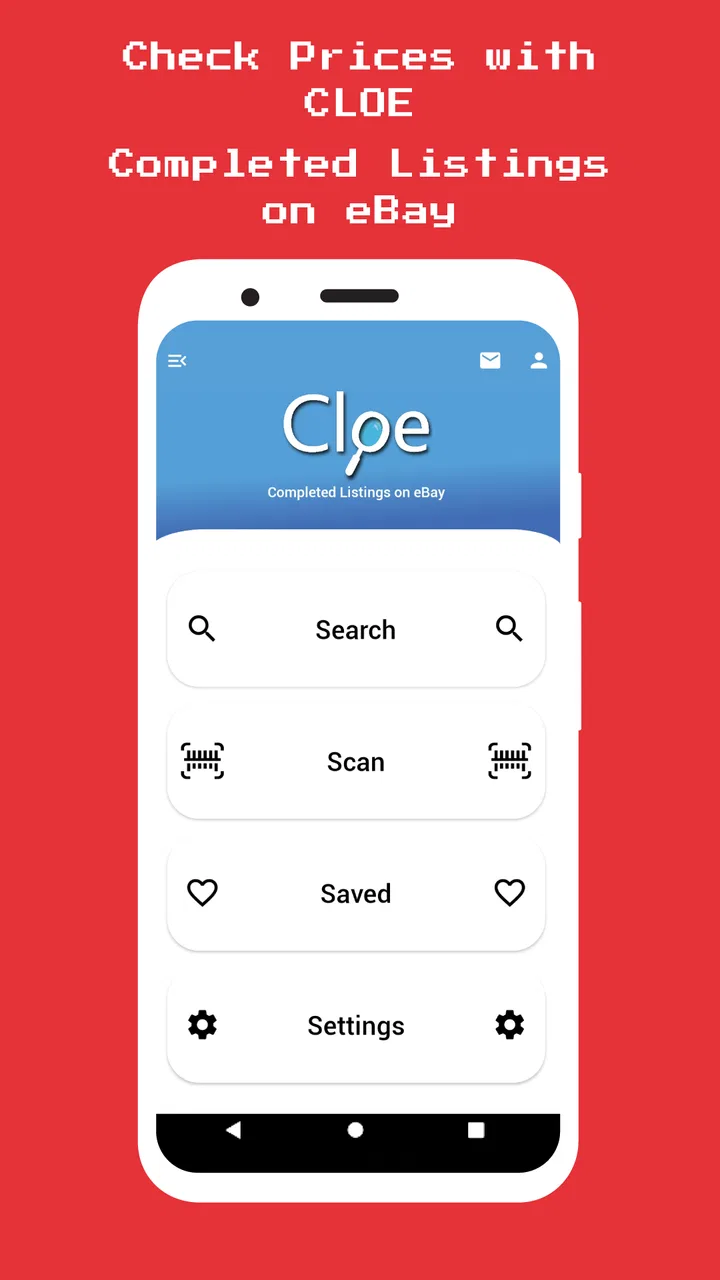
I like shopping tools that solve one narrow problem well, and Cloe Completed Listing on eBay takes that approach. Instead of trying to replace the eBay shopping experience, it focuses on helping me investigate an item before I decide what it is worth. I can search for an item or scan its barcode, then look at completed eBay listings and the lowest Buy It Now offers. That makes it especially useful when I am holding something in a shop, sorting through a box at home, or checking whether a tempting bargain is actually a bargain.
My first impression is that this is a practical research companion rather than a full marketplace. That distinction matters. If I want to browse sellers, manage an order, or complete a purchase, I would normally go to eBay itself. If I want a quicker way to compare past sales with current low-price listings, this app has a clearer purpose. The developer is Epic Appz, and the app sits in the Shopping category as a free download with optional purchases ranging from under a dollar to just under thirteen dollars per item.
How I Decide Whether This App Fits My Shopping Routine
The most important question is not whether the app can search eBay. The real question is whether I regularly need two kinds of information at the same time: what similar items have sold for and what sellers are currently asking through Buy It Now. That combination is more useful than looking at a single active listing, because an asking price is only a seller’s hope. Completed listings give me a better sense of what buyers have actually accepted.
You May Also Like

 AccuWeather: Weather Radar
AccuWeather Review: A Quick, Clear Forecast for Everyday Decisions
For everyday plans, the best forecast is the one you can understand quickly. AccuWeather makes rain timing, radar, and local conditions easy to act on, with a few trade-offs.

 Hill Climb Racing
Why Hill Climb Racing Still Turns Crashes Into One More Run
A tiny car, a bumpy hill and one more upgrade: Hill Climb Racing keeps resurfacing because its simple chaos makes every near-miss feel personal.

 AliExpress - Shopping App
AliExpress Makes Global Shopping Feel Personal, but Shoppers Bear the Risk
AliExpress turns a global marketplace into a pocket-sized discovery engine. Its reach is useful, its shopping loop compelling, and its trade-offs easy to miss.

 Lords Mobile: Kingdom Wars
Lords Mobile Is a Kingdom-Building Routine, Not a Quick Match
A case-by-case verdict on the building, battles, device demands, and social commitments that make Lords Mobile rewarding for some players and exhausting for others.

 PDF Scanner app - TapScanner
TapScanner Makes Paperwork Easier to Capture, Check, and Share
TapScanner makes scanning with a phone feel less like a rescue operation and more like a dependable step in getting work done. Its capture tools are useful, though not flawless.

 Block Blast!
 Shows How Much a Puzzle Game Can Leave Out
A quiet grid game shows why puzzle players increasingly value instant clarity, repeatable skill and low-pressure play—and where the genre still needs to catch up.
More From Our News Desk
View All News


I would consider this app a good match for someone who resells casually, checks collectibles, shops secondhand, or wants a quick reality check before listing an item. It can also help when I am negotiating at a flea market. A scan or search can turn a vague feeling that something “looks valuable” into a more grounded comparison. I still need to judge condition, completeness, authenticity, and shipping, but the app gives me a useful starting point.
The barcode option is particularly relevant for packaged products with a readable code. In that situation, scanning can be faster than typing a long product name or model number. It is less helpful for handmade goods, vintage objects, unbranded items, or products whose value depends heavily on edition and condition. For those, search quality depends on choosing precise words, and no scanning shortcut can remove that work.
I also pay attention to the app’s age and device requirements when deciding whether to install it. It was released in late summer of 2018, and the current version is 97. It supports Android devices running version 5.0 or later, so compatibility is broad for many older phones. The content rating is Everyone, which suits a general shopping utility. The app has passed the early experimental stage, but its modest community footprint means I would judge it by my own workflow rather than assuming it will behave like a major marketplace app.
What I Check Before Trusting a Result
When I use completed listings, I do not treat the first number I see as the value of my item. I compare several genuinely similar results. A used item with missing packaging should not be compared directly with a sealed example, and a bundle can make a single-unit price look misleading. This is one of the app’s most important practical limitations: it can surface comparisons, but I remain responsible for deciding whether they are truly comparable.
I also separate completed-sale evidence from current Buy It Now evidence. A low active price may represent a damaged item, a seller with expensive delivery, an incomplete set, or a listing that has been sitting unsold. On the other hand, a completed listing may reflect a particularly desirable color, accessory, or condition. I find the app most useful when I use both views as opposing checks rather than blending them into one assumed price.
A helpful habit is to search twice when an item has several common names. For example, I might use the manufacturer’s model wording first and then try a shorter description that buyers commonly use. The first search can reveal precise matches, while the second can expose comparable listings that use informal titles. This two-pass method is more valuable than simply scanning the same barcode repeatedly.
Where the Focused Design Wins
The strongest part of Cloe Completed Listing on eBay is its narrow decision-making loop. I identify an item, scan or search for it, inspect completed listings, and compare the lowest Buy It Now options. That is a more direct path than opening a general shopping app and manually moving between broad search results, seller pages, and unrelated recommendations.
For someone pricing a small batch of items, that focus can reduce mental clutter. I can use it while sorting a collection and make a quick note of which pieces deserve deeper research. The app is not trying to distract me with a large retail catalog. Its value comes from helping me answer a simple question: is this object worth further attention, and what kind of price range should I investigate?
The barcode workflow is another practical advantage when it works with the item in front of me. A product box may contain a model name that is difficult to read or type, especially in a dim storage room or crowded shop. Scanning can avoid spelling mistakes and get me to a relevant search faster. I would still inspect the returned results carefully, because a barcode can identify a product family without proving that the specific item has the same condition or included accessories.
The app is best understood as a price-checking lens, not a complete selling or buying account. That expectation makes the experience more satisfying. I use it before making a decision, not as the place where I handle every step afterward. Once I know whether an item merits attention, I can move to eBay or another marketplace for the transaction itself.
Everyday Situations Where It Saves Time
Imagine I am at a charity shop and find a boxed electronic accessory with a familiar brand name. Rather than guessing from appearance, I can scan the barcode and inspect comparable completed listings. If the sold examples are consistently modest and the current low Buy It Now offers are even lower, I can leave it behind. If the results suggest stronger demand, I can check the box, accessories, and condition more carefully before buying.
At home, I might use it while clearing a cupboard. Several items may look too ordinary to research individually, so I can begin with the easiest barcodes. Products that show little value can be donated without much time spent, while unusual results can receive a more detailed search. This is a good example of the app’s real strength: triage. It helps me decide where to spend my limited attention.
For a casual seller, the same process works in reverse. Before creating a listing, I can review completed examples to avoid choosing a price based only on optimism. I can then compare that evidence with the lowest active Buy It Now offers. If the market appears crowded with cheaper alternatives, I may choose a more competitive starting point or decide that the effort of listing is not worthwhile.
Collectors can benefit too, but only when they are disciplined about variants. A search for a common product title may mix different editions, sizes, languages, or release versions. I would use the app to discover the vocabulary sellers use, then refine the search with those details. The non-obvious benefit is that completed listings can teach me how an item is described in the market, not just what it sells for.
Where a General Marketplace App Is Better
If my goal is to buy immediately, Cloe Completed Listing on eBay may feel incomplete. A full marketplace app is usually the more natural choice for browsing seller profiles, checking delivery details, communicating with sellers, managing purchases, and handling the transaction. This tool’s focused research role does not replace those activities.
The same applies when I need rich product context. A dedicated marketplace experience may make it easier to inspect many photographs, read seller descriptions, compare shipping options, and follow an item from search to checkout. Here, the advantage is speed of valuation rather than depth of purchase management. I would not install it expecting a polished substitute for every part of eBay.
Price-history services can also be preferable for people who need long-term trend analysis, alerts, or organized records across many products. I would choose those kinds of tools when my work depends on tracking a market over time rather than making a quick decision about an item in my hand. Cloe’s appeal is more immediate: search now, compare evidence now, decide what to do next.
There is also a category of user who should probably skip it: someone who rarely checks resale prices and only buys familiar household products from ordinary retailers. If I already know what I want and do not resell or evaluate secondhand goods, a separate research app may add an unnecessary step. The app becomes worthwhile when price uncertainty is part of the shopping problem.
Friction I Notice During Real Use
Search results are only as good as the wording and the item match. A barcode may lead me toward the correct product, but it cannot tell me whether the particular example is complete, working, or desirable in its current condition. Manual searches can be more precise, yet they require patience. I would not rely on a single broad query for a rare or high-value item.
Another point of friction is interpreting low Buy It Now results. The lowest offer is not automatically the best deal or the true market floor. It may have a different condition, weaker presentation, or additional costs outside the headline price. I use it as a prompt to inspect the listing, not as an instruction to copy that number.
The free price makes experimentation easy, but optional purchases are part of the picture. The listed range runs from $0.99 to $12.99 per item, so I would pay attention to what is available without paying before building the app into a serious resale workflow. For occasional checks, the free entry point is attractive. For frequent professional use, I would first confirm that the paid elements provide enough value for the way I work.
The average rating is 3.8 from around 122 ratings, with 39 written reviews. I read that as a mixed but usable signal: enough activity to show that people have tried it, but not enough to make the rating a guarantee for every device or shopping habit. I would test it with ordinary low-risk searches before depending on it for an expensive purchase or a large inventory decision.
Switching From My Usual Method
The cost of switching is fairly low if my current method is simply opening eBay and searching manually. I would need to learn where the completed listings and lowest Buy It Now comparisons appear, then develop a habit of checking condition and quantity before drawing conclusions. The learning curve should be smaller than learning a full inventory platform because the app has a focused purpose.
Switching is less attractive if I already maintain a detailed spreadsheet or use a professional pricing system. In that case, this app may still be useful for quick field checks, but it would not replace a structured workflow for recording purchase cost, fees, delivery, profit, and sales velocity. Those decisions require more than a marketplace comparison.
I would also keep my existing marketplace app installed. This is not an either-or decision for me. I would use Cloe for discovery and valuation, then move to the marketplace that offers the best tools for buying or listing. That combination avoids forcing a specialized checker to perform tasks it was not designed to handle.
For a first test, I would choose three items with clear barcodes and three items that require manual search. I would compare how quickly each method finds relevant completed listings, then inspect whether the results match the exact model and condition. This small trial tells me more than an abstract promise because the usefulness depends heavily on the kinds of products I actually handle.
My Recommendation for Different Shoppers
I recommend Cloe Completed Listing on eBay to casual resellers, thrift shoppers, collectors, and anyone who often wonders whether an item is fairly priced. The combination of barcode scanning, search, completed-sale research, and low Buy It Now comparison gives those users a practical second opinion. It is especially appealing when I need an answer while standing in a shop rather than after I get home.
I recommend a cautious trial for serious sellers. The app can help with quick screening and market vocabulary, but I would not make it the only source for pricing valuable or unusual inventory. I would verify condition, sold quantity, delivery costs, and competing listings through the marketplace itself before committing money.
I would skip it if I want a full shopping account, detailed order management, or a complete inventory system. In those cases, the usual marketplace or a dedicated resale tool is a better fit. The app’s focused design is an advantage only when its narrow purpose matches the decision I am trying to make.
Overall, I see this free Shopping app from Epic Appz as a useful companion for checking eBay market evidence quickly. Its Everyone rating and support for Android 5.0 or later make it approachable for a broad range of users, while version 97 suggests an actively maintained product line. I would install it for price discovery, use its results with judgment, and keep another app ready for the actual purchase or sale. If you often need to separate a genuine bargain from a hopeful asking price, Cloe Completed Listing on eBay is worth trying.
FAQs for Cloe Completed Listing on eBay
01What is Cloe Completed Listing on eBay, and what can it help me do?
Cloe Completed Listing on eBay is designed to help sellers research previously completed eBay listings and understand how similar products have performed. By reviewing sold prices, listing details, and market activity, you can make more informed decisions about pricing, titles, descriptions, and selling strategies. It is especially useful when you want realistic market references instead of relying only on current asking prices.
02How can Cloe Completed Listing help me decide the right selling price?
The app can provide useful historical context by showing completed or sold listings for products similar to the item you want to sell. You can compare sale prices, condition, variations, shipping information, and listing formats before choosing a price. However, results should be treated as guidance rather than a guarantee, since demand, timing, item condition, seller reputation, and location can all affect the final result.
03Do I need an eBay account to use Cloe Completed Listing?
Whether an eBay account is required may depend on the app’s current features and how it accesses listing information. Basic research tools may allow users to search publicly available completed listings, while certain functions could require sign-in, permissions, or an eBay connection. Before downloading, review the app’s current store description and privacy information to understand account, login, and data-access requirements.
04Is Cloe Completed Listing on eBay free to download and use?
The availability of free features, subscriptions, advertisements, or in-app purchases can vary between versions and platforms. Some users may be able to perform basic searches at no cost, while advanced filters, expanded history, or additional seller tools may require payment. Check the Google Play or App Store listing before installing, and carefully review any subscription terms so you know what future charges may apply.
05Is the information shown by Cloe Completed Listing always accurate and up to date?
Completed-listing data can be valuable, but it may not always be complete, immediate, or perfectly representative of the current market. Listings can change, disappear, or be affected by cancellations, unusual sales, bundles, shipping costs, and different item conditions. For the best results, compare several recent examples, verify important details directly on eBay, and avoid basing a purchase or pricing decision on one result alone.
Pros
- Quickly marks eBay orders as completed after a sale is finalized.
- Helps keep completed-listing records organized in one place.
- Useful for sellers managing many listings and transactions.
- Can reduce repetitive manual updates in an eBay workflow.
- Simple purpose makes it easy to understand and use.
Cons
- Its usefulness depends on reliable access to your eBay account.
- May require extra verification when eBay security settings change.
- Not ideal for sellers who only manage a few occasional listings.
- An incorrect completion action could affect your sales records.
- Features may be limited compared with full eBay seller tools.

Cloe Completed Listing on eBay
Gallery